
Setting up a piano keyboard at home for the first time is an exciting milestone that lays the foundation for your musical journey. A proper setup does more than just keep your instrument safe; it directly influences your playing technique, physical comfort, and the longevity of the keyboard’s sensitive electronics. By taking the time to position your stand, adjust your bench, and manage your cables correctly, you create an inviting practice space that supports healthy posture and prevents unnecessary strain.
Whether you have a compact digital keyboard or a full-sized 88-key weighted digital piano, the initial assembly requires a systematic approach. From selecting the ideal spot in your home to performing the first system diagnostic, each step ensures your instrument operates exactly as the manufacturer intended. This guide walks you through the entire process, helping you transition from a boxed instrument to a fully functional, ergonomic home music station.
Preparing Your Space and Unboxing
Before you open the box, select a suitable location for your keyboard. In Singapore, where humidity and temperature fluctuate, choosing the right indoor environment is crucial for protecting the internal circuitry and physical components of your instrument. Position your keyboard in a dry, well-ventilated area away from direct sunlight, which can warp plastic casings, fade finishes, and damage sensitive LCD screens. Avoid placing the instrument directly beneath air conditioning units where condensation might drip, or near large windows that experience significant heat transfer during the afternoon.
Products mentioned in this guide
![Casio CT-S1 Digital Keyboard [FREE X-STAND] Portable 61 Keys Musical Instrument for Beginners](https://img.lazcdn.com/g/p/70d2952777c0faa1d5c43d84321fe320.jpg_400x400q80.jpg_.webp)
69 Lazada user ratings
The Casio CT-S1 is lightweight and portable., The Casio CT-S1 has a sleek design., will test it next few days and weeks. The keyboard have a…Read full reviewShow less
The Casio CT-S1 is lightweight and portable., The Casio CT-S1 has a sleek design., will test it next few days and weeks. The keyboard have a premium build.
The Casio CT-S1 is perfect for beginners., metronome only has 1 tempo. Delivery is too slow
Super fast delivery in next day. Well packed. Hope is suitable for my little one
Happy with the purchase. seller and driver polite and delivery is fast.
Received items the next day afternoon. Well packed. Looks really nice.

2 Lazada user ratings
Sound quality is good. Easy and useful guide provided. Item is light and portable. Seller provided regular progress update on delivery proce…Read full reviewShow less
Sound quality is good. Easy and useful guide provided. Item is light and portable. Seller provided regular progress update on delivery process and status.

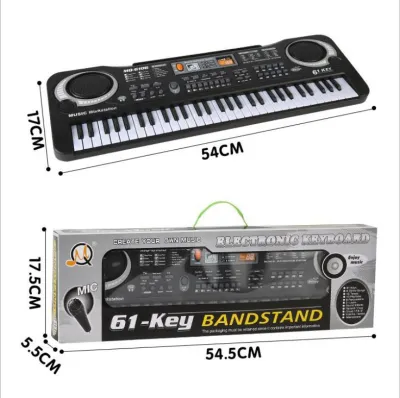
132 Lazada user ratings
Quality is good for its price. Delivery took longer than expected but still ok.
Worth for the price, can use to test kids interest to learn piano
2 keys need to press harder to work. Other than that is good👍👍
its very light weight very fast delivery thank you seller..
Great sound quality!, Stylish black design.,
![[✅SG Ready Stock] 61 Key High Quality Music Keyboard Piano kids toys new player beginner Electric Piano](https://img.lazcdn.com/g/p/1f34b80fc1c4ffa462a06ed0ad2ca2fd.jpg_400x400q80.jpg_.webp)
67 Lazada user ratings
The piano is easy to assemble., High-quality piano.
Fast shipping and reliable seller.,
the stand had a dent.
🎧Sound Quality: good
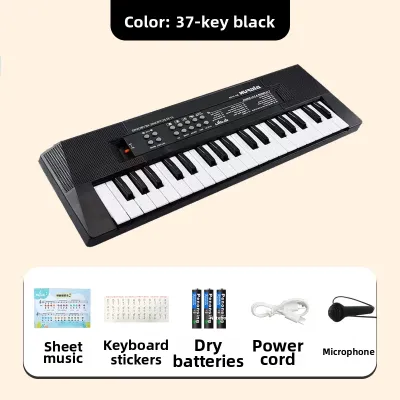
8 Lazada user ratings
For the price paid, im hqppy with the purchase. It has some nice features like backing tracks and a mic. Son is happy playing the keyboard.
The quality is really good, and I really like it.
good piano for my girl
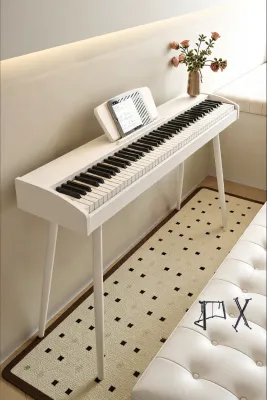
14 Lazada user ratings
The keyboard sounds clear and beautiful, and the keys feel really smooth. It has a great range of features that are perfect for beginners. I…Read full reviewShow less
The keyboard sounds clear and beautiful, and the keys feel really smooth. It has a great range of features that are perfect for beginners. It's high quality and I'm very satisfied!
The piano is absolutely beautiful. The touch feels very natural and great, and the whole thing looks high-end. Awesome!
This electric piano sounds great, it's portable, and feels good to play. Definitely recommend buying it!
My child loves it. This keyboard feels high-quality and has brought so much joy to our kid.
got the hammer keys version, the keys felt weighty and sound was good
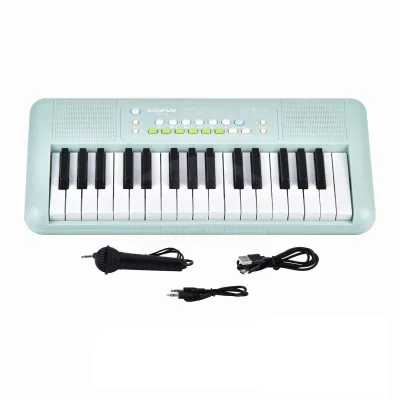
Prices are valid at publication and may change. Please refer to the product page for the latest price.
Once you have identified the perfect spot, clear a spacious work area on a clean, flat floor to begin the unboxing process. Lay the cardboard shipping box flat on its side or upright as indicated by the packaging arrows. Carefully cut the sealing tape using a utility knife, taking care not to plunge the blade deep into the box where it could scratch the keyboard chassis. Gently slide the foam end-caps and the wrapped keyboard out of the box, preferably with the help of a second person if you are handling a heavy, weighted-action model.
Before discarding any packaging material, conduct a thorough inventory check against the manufacturer’s packing list. Keep the keyboard wrapped in its protective plastic sleeve while you locate and group all included accessories, which typically include the power adapter, music rest, sustain pedal, and assembly hardware. Inspect the cardboard inserts and foam blocks carefully, as small items like screws or product manuals are often tucked into dedicated recesses. Retain the original box and packing materials for at least the duration of the retailer’s return window, as shipping a large instrument without its original molded foam is highly risky.
Assembling the Keyboard Stand
A stable foundation is essential for a safe and comfortable playing experience. Keyboard stands generally fall into three categories: X-stands, Z-stands, and fixed wooden console stands. X-stands are highly portable and adjustable, making them popular for smaller spaces, though they can sometimes restrict legroom. Z-stands offer excellent stability and open leg space, while fixed wooden console stands provide a furniture-like aesthetic and the most rigid support for heavier 88-key digital pianos. Whichever style you choose, verify that the stand’s weight capacity exceeds the weight of your keyboard.

To assemble a metal X-stand or Z-stand, begin by laying out the frame pieces and identifying the top support arms (which feature rubber end caps to grip the keyboard) and the bottom feet (which are typically wider for stability). Use the provided hex keys or wrenches to secure the crossbars, ensuring you do not cross-thread the screws. If you are assembling a wooden console stand, align the side panels with the rear modesty board, insert the wooden dowels or metal cam locks, and tighten them securely. Always assemble the stand on a soft surface, such as a rug or towel, to prevent scratching the finish.
Once the stand frame is fully assembled, place it in its designated spot and check for any wobble. Most modern stands feature adjustable leveling feet; rotate these rubber dials until the stand sits perfectly flat on your floor. Next, carefully lift the keyboard and place it onto the stand, centering it precisely from left to right. Many keyboards feature threaded mounting holes on their underside that align with specific slots on compatible stands. If your stand and keyboard are designed to bolt together, insert the matching mounting screws through the stand bracket into the bottom of the keyboard and tighten them by hand before securing them with a screwdriver. For non-bolted setups, ensure the rubber grip pads on the stand arms are positioned directly beneath the flat plastic chassis of the keyboard, avoiding any ventilation slots.
Positioning the Bench for Proper Posture
Ergonomics play a vital role in preventing fatigue and repetitive strain injuries during long practice sessions. Your piano bench should not be treated as an afterthought; its height and distance relative to the keys dictate your entire physical alignment. When sitting on the bench, your elbows should rest at or slightly above the level of the keybed when your hands are placed on the keys. If your elbows are too low, you will be forced to raise your shoulders or drop your wrists, both of which restrict fluid movement and can lead to chronic tension in your forearms.
To determine the correct distance from the keyboard, sit on the front half of the bench rather than slouching back. Your knees should extend slightly beneath the underside of the keyboard structure, allowing your feet to rest completely flat on the floor. This grounded foot position is essential, as it provides stability and allows you to operate the sustain pedal comfortably without shifting your weight or straining your lower back. If you are using an adjustable bench, utilize the adjustment knobs on either side to raise or lower the seat until your thighs are roughly parallel to the floor and your forearms are horizontal to the keys.
If you are using a fixed-height wooden bench or a standard household chair that sits too low, you can temporarily adjust your height by adding a firm, non-slip cushion. Avoid soft, plush cushions that sink deeply, as they do not provide the stable pelvic support required for active piano playing. Ensure that your posture remains upright but relaxed, with your shoulders dropped and your wrists flexible. Taking the time to establish these physical reference points during your initial setup prevents the formation of poor habits that are difficult to unlearn later.
Connecting Power and Managing Cables
Proper electrical connection and cable management protect your keyboard’s internal components and keep your practice space safe. Start by examining the power adapter supplied with your keyboard. Locate the DC IN port on the rear panel of the instrument and insert the small barrel plug firmly. Only after this connection is secure should you plug the AC adapter into the wall outlet or power strip. This sequence prevents accidental electrical arcing at the keyboard’s sensitive input jack, which can damage the internal power regulation board over time.
Given the sensitive digital processors inside modern keyboards, plugging your instrument directly into a standard wall outlet exposes it to potential voltage spikes. It is highly recommended to use a high-quality surge protector between the power adapter and the wall. In Singapore, where tropical storms can cause sudden electrical fluctuations, a surge protector acts as a vital buffer. If your setup includes other electronic accessories, such as active monitor speakers, an external amplifier, or a laptop for music production, plug all of these devices into the same surge protector to minimize the risk of ground loop hums that degrade audio quality.
Once the power connections are made, organize the trailing cables to prevent physical hazards. Route the power cable, pedal cords, and headphone lines down the back of the stand, away from the moving joints of the stand and the path of your feet. Use the integrated cable clips on your stand, or secure the wires to the frame using reusable hook-and-loop cable ties. Ensure there is enough slack in the pedal cable so that the sustain pedal can sit flat on the floor without pulling on the rear jack of the keyboard. Keeping cables tidy not only looks professional but also prevents tripping hazards and protects the ports from being damaged by sudden tugs.
Initial Power-On and System Check
With the physical assembly and electrical connections complete, you are ready to perform the initial power-on and system diagnostic. Locate the power button or switch, which is typically found on the left side of the control panel or on the rear chassis. Press the button and observe the instrument’s interface. If your keyboard features an LCD screen, verify that it lights up clearly and displays the default home screen or patch name without flickering. For models with simple LED indicators, ensure the power light glows steadily, indicating a successful boot cycle.
Next, conduct a systematic test of the keybed to verify that every key is functioning correctly. Starting from the lowest bass note, play each key individually up to the highest treble note. Listen carefully to ensure that every key produces a clear, consistent sound and returns promptly to its resting position without sticking, clicking, or scraping. If your keyboard features touch-sensitive or weighted keys, play a few notes softly and then firmly to confirm that the volume responds dynamically to your finger velocity. This step ensures that the internal sensors are calibrated correctly and have not been jarred during shipping.
Finally, test your accessories to ensure full system integration. Plug your sustain pedal into the dedicated jack (usually labeled DAMPER or SUSTAIN) on the rear panel, play a chord, and depress the pedal; the sound should ring out smoothly and damp immediately when you release your foot. If the pedal operates in reverse—sustaining when released and cutting off when pressed—look for a small polarity switch on the bottom of the pedal housing and flip it to the opposite position. Plug a pair of headphones into the PHONES jack to verify that the internal speakers mute automatically and that you receive a clean, static-free stereo signal in both ears. If your keyboard has built-in speakers, unplug the headphones and adjust the master volume slider to confirm smooth, distortion-free audio playback across the entire volume range.
Frequently Asked Questions (FAQ)
Do I need a dedicated electrical circuit for my keyboard?
No, you do not need a dedicated electrical circuit for a standard home keyboard or digital piano. Most consumer keyboards are highly energy-efficient, typically drawing between 10 and 40 watts of power, which is comparable to a standard LED light bulb. They can safely share a standard household outlet or power strip with other low-power devices like a desk lamp, tablet charger, or metronome. However, to protect the sensitive digital microprocessors inside your keyboard from unexpected voltage fluctuations, you should always connect it through a reliable surge protector rather than directly into the wall.
How should I clean the keys right after unboxing?
Right after unboxing, your keyboard keys may have a light residue or dust from the manufacturing and packaging process. To clean them safely, use a dry, clean, ultra-soft microfiber cloth to gently wipe down the surface of the keys. If there are visible smudges, slightly dampen the microfiber cloth with plain water, wring it out thoroughly so it is barely damp, and wipe the keys from back to front. Never spray water, liquid cleaners, or alcohol-based sanitizers directly onto the keyboard, as excess moisture can easily seep between the keys and corrode the delicate electronic contact strip underneath.

Community discussion
Share your experience or ask a question. Comments are reviewed before publication.